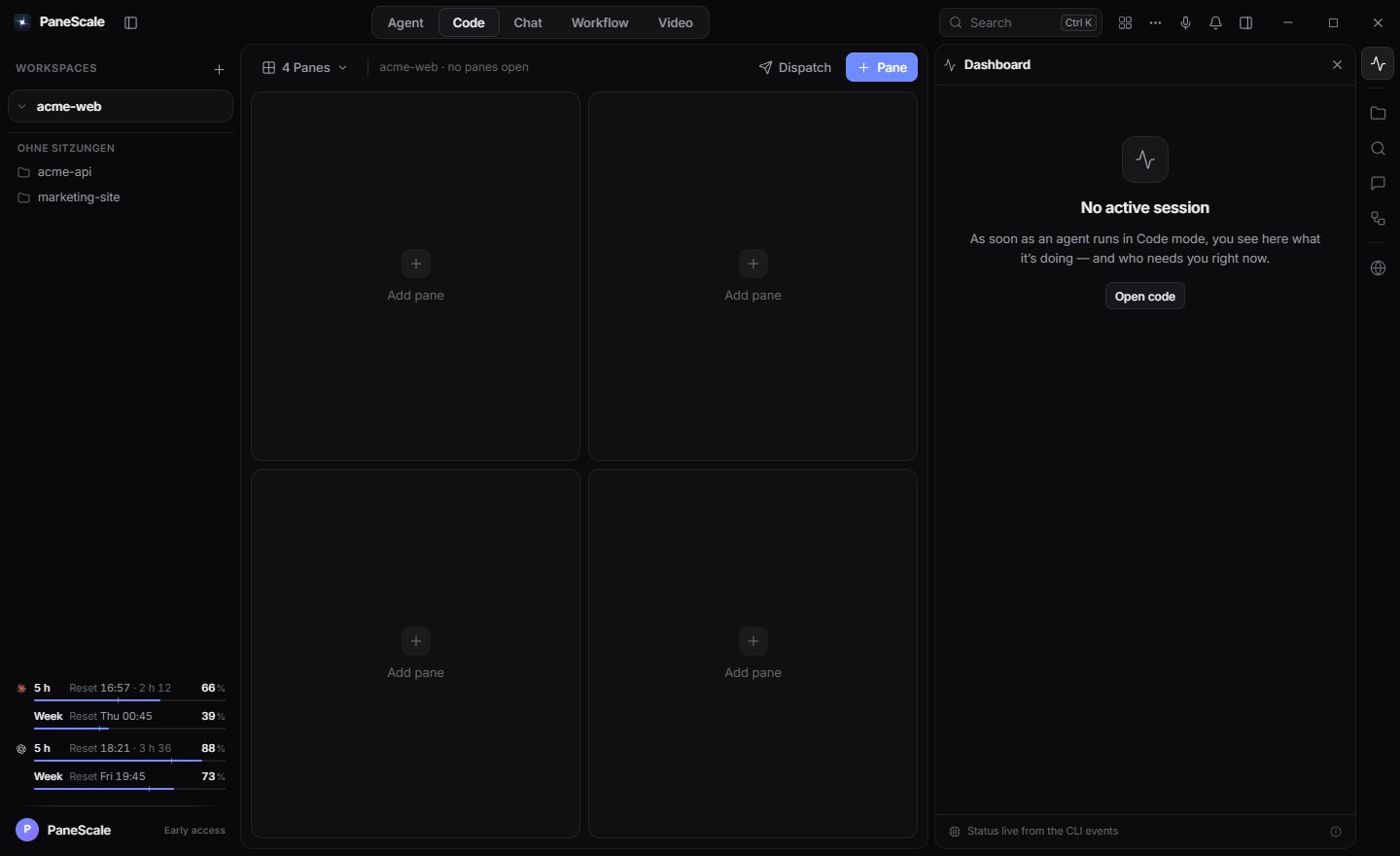

Scale your agents, not your tabs.

Run Claude Code, Codex, Gemini CLI and seven more side by side. Every agent gets its own pane and Git worktree, a checkpoint before each step, and a budget that really stops.

  • Windows, macOS & Linux
  • From $6.99/month
  • Uses your existing agent subscriptions
The real app

The agents you already use,
finally side by side.

PaneScale finds the coding CLIs on your computer and starts them with the sign-ins you already have. Missing one? It shows you the install command.

Claude Code starts with claude Missing?npm install -g @anthropic-ai/claude-code

Why it’s called PaneScale

  1. Our mark is the product: every agent in its own pane, all of them in one workspace.

  2. Each pane is a real terminal on its own Git worktree. Nobody edits anyone else’s files.

  3. Before an agent changes files for you, PaneScale takes a byte-exact checkpoint. Rewind one and watch.

  4. Status for every pane, one attention list for every question.

  5. Usage is measured, daily budgets stop runs and loops get paused.

Sample sessions in a demo repo, drawn the way each CLI draws them.

16

panes in one workspace, split and resized any way you like

10

coding CLIs found automatically, with install commands for the rest

1 click

to rewind any agent step to the exact bytes before it

0

PaneScale servers between you, your agents and your code

Watch it work.

10 short films, one per feature, recorded in the real PaneScale app — every pane, dialog and diff is the actual interface. The projects and agents are sample data. Sound off, under half a minute each.

One window for every agent

Agents side by side in one project, a question answered right in the pane, one prompt to all.

All films on one page

Six things you stop doing by hand.

Running agents in parallel only pays off if you can trust what they leave behind. PaneScale does the bookkeeping — isolation, verification, rollback and limits — so you can review results instead of babysitting terminals.

0106

Every agent in its own lane.

Tick “Isolated worktree” when you add a pane and the agent works in its own Git worktree, on its own branch, from your current commit. Three agents can change the same repository at once without touching each other’s files — or yours. When one is done, you decide what happens to its work.

  • One worktree and one branch per pane, created from your current commit
  • Keep it as a commit on its branch, merge it or discard it
  • Merging asks for a signed approval that is valid exactly once
How it works

0206

Rewind any agent step, exactly.

Before every agent turn that can touch your files, PaneScale stores a checkpoint under a private Git ref. Your branches, index and HEAD are never moved. Rewinding restores the exact bytes — and refuses to overwrite a file you edited yourself afterwards.

  • Checkpoints live under refs/panescale, outside your history
  • Every file is compared byte for byte before it is restored
  • Also taken before you adopt an autopilot result or a Point & Fix change
How it works

0306

Click the broken thing. Say what’s wrong.

Open your dev server in the browser pane and click any element. PaneScale finds where it lives in your source, lets an agent change it in a worktree copy that includes your uncommitted work, runs a quick check and shows you the diff before anything lands.

  • Source location from React, Vue and Svelte debug info, or text search
  • A guessed location is always labeled as a candidate
  • Apply, keep, refine — or undo
How it works

0406

Budgets that actually stop the run.

Token usage is read from the agents’ own event streams, not estimated from characters. Give Claude Code and Codex a daily budget — the backend enforces it, the window can’t bypass it. Six loop rules catch repeated commands, stalls, token spikes and output floods.

  • Attended runs pause, unattended runs stop
  • Mark an alert as “not a loop” with one click
  • Engines that don’t report usage are shown as “not reported”, never guessed
How it works

0506

Limit reached? Hand the session over.

When an agent stops halfway — a usage limit, a dead end — choose “Hand over to another agent” on its pane. PaneScale opens the next agent in the same project and pastes a brief with the end of the previous session, marked as a record to verify, not as instructions to follow.

  • Pick any other installed agent to take over
  • The brief carries the last part of the session — no copy-paste between terminals
  • In the Overnight Autopilot a backup agent takes over after half of the attempts, with the feedback from checks and diff
How it works

0606

A queue that works while you sleep.

Collect tasks during the day — your own, cards from the board, or GitHub issues. At night PaneScale works through them one by one, each in its own worktree, with retries, time and token limits and your project’s own checks. In the morning you get a frozen report.

  • “Ready” only with required checks passing and no regressions
  • Preflight checks Git, disk space and CLIs before the first task
  • Draft pull requests only when you click, with a one-time approval
How it works

When one prompt isn’t enough.

Some work is a sequence, not a single request. Two studios turn PaneScale from a terminal grid into a place where agents, tests and people take turns.

Workflow Studio Pro

Write the brief once, then chain up to sixteen steps from left to right: coding agents, local or custom model prompts, test commands, browser checks, a Git review, MCP tools and your approval. Run it by hand, on an interval or on every new commit.

Explore Workflow Studio

Video Studio Labs

Describe a product video and a coding agent directs it: scenes of canvas code appear live on a multi-track timeline — with transitions, camera moves, kinetic captions and sound. Export MP4, WebM or GIF in every format at once, locally.

Explore Video Studio

Say it. The grid does it.

Dictate into any field or straight into the focused pane — or speak a command. whisper.cpp transcribes on your own machine; the audio never leaves it and is deleted right after.

local · whisper.cpp
Command — pick a phrase or type your own
  • Runs on your machinewhisper.cpp with the model you choose. No cloud, no upload.
  • English and GermanFiller words are ignored, near misses get a “did you mean”. Dictation also in Arabic, French and Spanish.
  • Nothing risky by voiceDelete, approve, merge, push and deploy always stay a click.
Everything about Voice

The details that make a grid a workspace.

Built into the same app, on the same projects.

Dispatch

Type once: the same prompt to every pane, or a task list that free panes work through.

Pre-warmed sessions

Free grid cells keep a started session waiting, so a new pane is instant.

Lanes

One Git worktree and branch per pane. Keep, merge or discard when you close it.

Attention dock

Every pane that waits for you, in one list — approve without hunting.

Status detection

Hooks, terminal signals and prompt detection tell you who is working and who is waiting.

Teammates

Persistent agents with a role, rules, allowed folders and long-term memory.

Chat

Threads stored locally, streamed answers, dictation in the composer.

Tasks board

Ready, running, needs review, done — and only a person can mark a card done.

Routines

Interval, daily or weekly runs in a fresh thread, with a missed-run window.

MCP bridge

Let other agents read and create board tasks through a local MCP server.

Approvals

Signed, single-use approvals for anything that leaves your machine.

Docks

Files, search, browser, thread and workflow right next to the grid.

Command palette

Everything is a few keystrokes away with Ctrl K.

Remote SSH

Keep hosts in one list and check that they answer before you need them.

Themes

Dark, light or system, with matching terminal colors.

Accounts

Work and personal sign-ins for the same CLI, side by side. Pick the profile per pane.

Safe defaults, not safety theater.

Agents are powerful and occasionally wrong. These rules are built into PaneScale, not left to a prompt.

Local first

No account server sees your code. Agents talk to their own providers; everything else stays on your disk.

Isolated by default

Lanes are real Git worktrees with their own branch. Nothing is merged, pushed or deleted without your decision.

Judged by facts

The autopilot, workflows and Point & Fix report numbers from recorded runs and your own checks — never an agent’s claim of success.

Signed approvals

Publishing actions need a signed approval that can be claimed exactly once. The MCP bridge is off until you turn it on.

Two plans. Free while in early access.

Your agent subscriptions stay with their providers. PaneScale is a flat price for the workspace around them.

Core

The complete workspace for running several coding agents side by side — safely.

$6.99/ month

or $69.90 a year — two months free

Download free
  • Up to 6 panes in one freely resizable grid
  • All 10 coding CLIs — Claude Code, Codex, Gemini CLI and more
  • Lanes: its own Git worktree and branch for every agent
  • Live dashboard that shows which session needs you
  • Dispatch: one prompt to every pane — or a task list the panes work through
  • Agent, Code and Chat modes, tasks board and routines

Need it for a team? Get in touch

Install in under a minute.

Windows, macOS and Linux. One installer per system, no admin rights, updates with a single click from inside the app.

WindowsAvailable

Windows 10 and 11, x64. Installs for the current user only.

Version0.3.12
Installer8 MB · NSIS
UpdatesIn-app, one click
Download for Windows
macOSAvailable

macOS 11 or later. One app for Apple silicon and Intel, signed and notarized by Apple.

Version0.3.6
Disk image17 MB · Drag to Applications
UpdatesIn-app, one click
Download for macOS
LinuxAvailable

x86_64: Ubuntu 22.04+, Debian 12+, Fedora, openSUSE, Arch. Installer, .deb or .rpm.

Version0.3.5
Installer8 MB · With a short wizard
UpdatesIn-app, one click
Download for Linux

All downloads, requirements and checksums

Before you
install.

More in the docs and the help center.

What is PaneScale?

A desktop workspace for coding agents. PaneScale starts the CLIs you already use — Claude Code, Codex, Gemini CLI and 7 more — each in its own pane of one resizable grid, and adds what a single terminal can’t: a Git worktree per agent, a checkpoint before every step, daily budgets and an overnight autopilot.

Take the product tour
Which coding agents can I use?

Claude Code, Codex, Gemini CLI, GitHub Copilot CLI, Cursor Agent, Grok Build, Aider, Kimi CLI, Droid and OpenCode. PaneScale finds the ones installed on your machine, and you can mix them freely — a different CLI in every pane.

Supported CLIs
Can I use PaneScale with just one agent?

Yes. Many people start with a single pane and use checkpoints, the Guardian and Point & Fix. The grid grows when you need it.

Getting started
What happens if an agent breaks something?

Every agent turn that may edit files gets a checkpoint first, and so does every adopted result. You can rewind a step or single files to the exact bytes they had. If you changed a file yourself in the meantime, PaneScale refuses to overwrite it and tells you so. Panes can also work in their own lane, so your main branch stays untouched until you merge.

Checkpoints and rewind
Can an agent burn through my tokens?

Not unnoticed. The Token Guardian counts the usage your agents report and gives each engine a daily budget — Claude Code and Codex start with 5 million tokens a day. When a run crosses it, PaneScale stops the turn or pauses and asks you, whichever you chose. Agents stuck in a loop are caught too.

Token Guardian
Does my code go through your servers?

No. PaneScale runs on your machine. Agents talk directly to their own providers, worktrees and checkpoints are plain Git on your disk, and chats, runs and settings live in a local database.

Your data
Do I need new AI subscriptions?

No. PaneScale starts the coding CLIs you already have installed and signed in to. Your usage is billed by those providers exactly as before — PaneScale is the workspace around them, and work and personal accounts can sit side by side.

Accounts and profiles
How much does PaneScale cost?

Core is $6.99 and Pro $9.99 a month; paying yearly gets you twelve months for the price of ten. Team adds central billing for every seat — get in touch. The price covers the workspace only; agent usage stays with your providers.

See pricing
What’s the difference between Core and Pro?

Core is the full workspace for up to 6 panes: all 10 CLIs, lanes, Dispatch, checkpoints, the Token Guardian and local dictation. Pro raises the grid to 30 panes and adds orchestration — the overnight autopilot with its morning report, limit handoff between agents and Workflow Studio — plus Point & Fix and the Video Studio.

Compare plans
Can I use it for free?

Yes. PaneScale is in early access: everything in Pro is free, with no account and no card. Paid plans (Core and Pro) start later — announced first, never charged automatically.

Can I change plans or cancel?

At any time. When you cancel, nothing is deleted: worktrees, checkpoints, chats and runs stay on your disk, and your Git history stays in your repositories.

Which operating systems are supported?

Windows 10 and 11 (x64), macOS 11 or later as one app for Apple silicon and Intel — signed and notarized by Apple — and Linux on x86_64 (Ubuntu 22.04+, Debian 12+, Fedora, openSUSE, Arch) with an installer, .deb or .rpm. None of them need admin rights.

Install PaneScale
Where do I report a bug or a security issue?

Bugs and questions: support@impulse-apps.de. Security reports: info@impulse-apps.de — we answer those first.

Still unsure? or write to info@impulse-apps.de

Give every agent its own pane.

Install PaneScale in under a minute. Your CLIs, your accounts, your machine.